
Three server states
The plugin doesn't guess from Discord chatter. It knocks on your own server — the one the game connected to when you entered the world — and checks NCSOFT's official announcements. That gives three states.
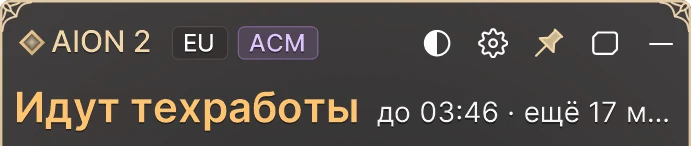
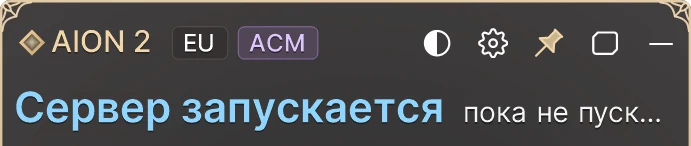
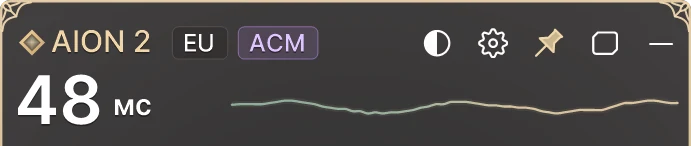
Screenshots show the Russian interface. On an English Windows the plugin switches to English by itself.
- Maintenance. The window comes from NCSOFT's notice board on the official site, with Steam news as the backup. The plugin shows the scheduled end and the time left, on your PC's clock.
- Server starting. Maintenance is done and the world is booting, but nobody gets in. The tell: the server drops a connection almost instantly, in about 0.1 s. During this phase the plugin checks every 6 seconds.
- Server is open. The server holds connections again. To avoid false alarms the plugin double-checks — three probes in a row — and only then chimes and shows “Opened at 13:43 · jump in”.
There's a fourth state nobody likes: Running late. The scheduled end has passed and the server still hasn't started. The plugin shows how far over schedule it is.
A server that's down for maintenance holds a connection exactly like a live one, so a single probe can't tell them apart. That's why maintenance comes from the announcement, while “starting” and “open” come from the probes.
It's light on the server: one probe is a single empty connection with no data in it. Normally it runs every 30 seconds, during maintenance every 15. If the game on this PC is already in the world, the plugin simply says “You're in game”. And if maintenance is announced for the next three days, you'll see it in advance — “Maintenance tomorrow at 09:30 for 4 h”.
How maintenance goes: October 14, 2026
The plugin was born that day: restarting the game every five minutes to see whether the servers were back got old fast. Here's how that maintenance went (UTC):
- 06:30–10:30 — the window in NCSOFT's announcement.
- 10:27:57 — the server started dropping connections. The world is starting, no logins.
- around 10:43 — the server lets players in again. Open.
On paper maintenance ended at 10:30. In practice you could log in at about 10:43, after roughly 15 minutes of start-up. Lesson: the end time in the notice isn't the moment you get in. Don't restart the game in a loop — wait for the chime.
We learned one more thing that day. After 24 simultaneous connections from one address, the server stopped letting that address in for a while. That's why the plugin probes gently, one connection at a time.
Maintenance log
Maintenance we caught ourselves: the scheduled window, when the server was starting and when it opened.
| Date | Scheduled | Starting | Open | Over schedule |
|---|---|---|---|---|
| Oct 14, 2026EU | 06:30–10:30 | from 10:27:57 | ~10:43 | +13 min |
Connection errors
Check the status first. If it's maintenance or the server is starting, there's nothing to fix — just wait, the plugin will tell you. If it says open and you still can't get in, the problem is on your side or somewhere on the route to the server.
Lost connection to the game server
You got kicked mid-game. Usually that's maintenance starting or a hiccup somewhere between you and the server.
- Check the status. When maintenance begins, the plugin shows “AION 2 — servers went down” and starts waiting for the opening.
- Server open? Restart the game. Still nothing — restart Steam too.
- Look at ping and packet loss in the plugin. Spiky ping or loss above 0% points to the route: Wi-Fi, router or ISP.
- Try another connection, for example your phone's hotspot. If the game works there, your main network is the culprit.
Can't connect to the server
The game can't reach the server when you log in.
- Maintenance — logins are closed until it's over. The plugin shows until when.
- Server starting — usually minutes away. On October 14 it took about 15 minutes.
- Server is open but the game won't let you in — the problem is on the route, not the server. Check ping and loss. The main window also has a Login server row that shows whether the login server answers.
- “No connection” in the plugin means your internet is down: even public addresses don't answer. “Servers down” means your internet works but the game servers are silent.
Stuck and can't get into the server
The catch-all: endless loading, a login that never goes through, a different error every time.
- Check the status and the clock. Right after an opening, everyone who waited piles in at once.
- Look at the Online on Steam row in the main window: how many people are playing right now and the 24-hour peak. Normal numbers mean the server is fine.
- Restart Steam and the game.
- Check ping and loss, and try another connection.
Windows 10/11 · zip · no install · free · Updated Oct 16, 2026
It runs on a Windows PC. On your phone? Send the link to your Telegram ·
Get notified when servers open
No need to sit there refreshing. Turn on alerts and go do something else.
- Chime. When the server opens, the plugin plays a chime and shows a Windows notification: “AION 2 — servers are open!”. A bit earlier, when the world starts booting, you get a soft tone and “AION 2 — servers are starting”. Turn the sound on or off in the tray menu: “Sound when servers open”.
- Straight into the game. Tray → “Launch the game when servers open”: the plugin starts AION 2 the moment the server lets players in.
- Micro — one button. A single button on your screen: grey with “till 13:30” during maintenance, glowing gold when the server opens. The main window highlights the opening for a minute.
- Telegram. Send /notify to @Aion2Status_Bot and pick your region. The bot sends silent messages about announced maintenance, its start, server start-up and opening. It probes Europe itself; other Global regions follow NCSOFT's official announcements. Current status: /status, optionally with a region — /status NA-E.
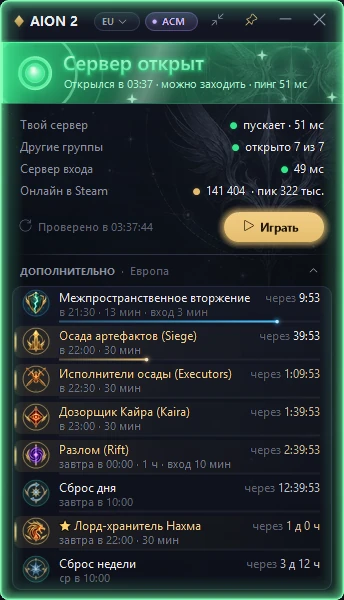
All of this comes with the free plugin — get AION2 Status. While you wait, check server regions, reset times and ping or set up the boss timer for your server.
Frequently asked questions
Is AION 2 down right now?
Open the plugin: it checks your own server live and shows Maintenance, Server starting or Server is open. Away from your PC, send /status to the Telegram bot @Aion2Status_Bot.
When does AION 2 maintenance end?
The plugin shows the end time from NCSOFT's announcement on your PC's clock. Expect a few extra minutes: on October 14, 2026 the server spent about 15 minutes starting up and let players in roughly 13 minutes after the scheduled end.
What does “Server starting” mean?
Maintenance is over, but the world isn't letting anyone in yet: the server drops every connection right away. Wait for the open chime instead of restarting the game.
I got “lost connection to the game server”. What now?
Check the status first. If the server is open, restart the game and then Steam, look at ping and packet loss in the plugin, and try another connection such as a phone hotspot.
Can I get notified when the servers are back?
Yes. The plugin plays a chime and shows a Windows notification. Away from your PC, send /notify to @Aion2Status_Bot for silent Telegram alerts.